
The Landing pages module has been slightly automated and simplified. In this update, automatic redirection to the homepage when deactivating landing pages has been deployed. There were also a few minor adjustments and repairs.
The list of modifications is as follows:
- Automatic redirects
- Minor edits to blocks
Automatic redirects
Automatic redirects are available within all modules. Within the module, these redirects were missing and have been added. They work for Microsite as follows:
- If the page is active, the user is taken to that page when clicked,
- If the page is inactive in a given language, the user is redirected to the homepage in their language,
- If the page is globally inactive, the user is redirected to the homepage in their language,
- If the page is deleted, the user is presented with a "404" error page.
For the purposes of other page types, the rules are as follows:
- App page on the Appstore app listing:
- When deactivated, the page is replaced with a standard 404 error page.
- When deleted, the page is replaced with a standard 404 error page
- Position page from the "Careers" module:
- When deactivated, the page is redirected to the "Careers" template page listing all positions,
- When deleted, the page is replaced with a standard 404 error page
- Page from the "Glossary of Terms":
- When deactivated, the page is redirected to the template page "Glossary" with a listing of all entries,
- When deleted, the page is replaced with a standard 404 error page
- "Events" page from the module: "Events":
- When deactivated, the page is redirected to the page with the template: "Event listing" according to the type of event:
- If it is a small event, the page is redirected to the listing: "All small events"
- If it is a large event, the page is redirected to the listing: "All large events"
- If deleted, the page is replaced with a "404" error page.
- When deactivated, the page is redirected to the page with the template: "Event listing" according to the type of event:
- "Article" page from the module:
- When deactivated, it redirects to the first article category, if any is available,
- If none is available, the article is redirected to a listing of all articles,
- If the listing of all articles is not available, the page is redirected to the homepage
- When deleted, the page is replaced with a "404" error page.
- Page "Page" from the module "Pages":
- If this is a page hidden behind the login page, then on deactivation it redirects to the Login page of the internal site zone,
- If it is the Login page for the internal zone and the user is logged in, the user is redirected to the Login page for the Internal zone,
- When deactivated, the redirection to the homepage of the site occurs,
- When deleted, the page is replaced with a "404" error page.
- The "Reference" page of the "Reference" module:
- When deactivated, redirects to a page listing all references,
- If the page listing all references is not available, it redirects to the homepage of the site,
- When deleted, the page is replaced by a "404" error page.
- Page: "Industry Solutions" from module: "Solutions":
- When deactivated, a redirect to a page listing all industry solutions occurs,
- If the page listing all industry solutions is unavailable, it will redirect to the homepage,
- When deleted, the page is replaced by a "404" error page.
- Page: "Product Category" from module: "Solutions":
- When deactivated, redirects to a page listing all product categories,
- If the page listing all industry solutions is unavailable, it will redirect to the homepage,
- When deleted, the page is replaced by a "404" error page.
- The "Product" page from the module "Solutions":
- When deactivated, the first available product category (by breadcrumb) is found and the page is redirected to it,
- If the product category is inactive, the solution listing page is searched and redirected here,
- If the page is unavailable, it redirects to the homepage,
- If deleted, the page is replaced with the error page: "404".
- Page: "Solution" from module: "Solution":
- When deactivated, a redirect to a page listing all industry solutions occurs,
- If the page is unavailable, it will redirect to the homepage,
- When deleted, the page is replaced by an error page: "404".
Some sites also have their own modules - such as Business and their own module: "Support".
Here mostly general rules are applied that work for other modules as well, or it always depends on your own agreement.
In general, the rule is that pages should not be deleted - to avoid creating 404 statuses. Pages should ideally not be deactivated either. However, this automated procedure addresses the situation where a page is deactivated - invalidating the content and preventing unnecessary 404 statuses.
Minor edits to blocks
Within the Microsite blocks, the "Text block with frame" block has been extended to include the option of drop-down photos. You can simply enable this by setting the block with the checkbox: "Zoom Image".
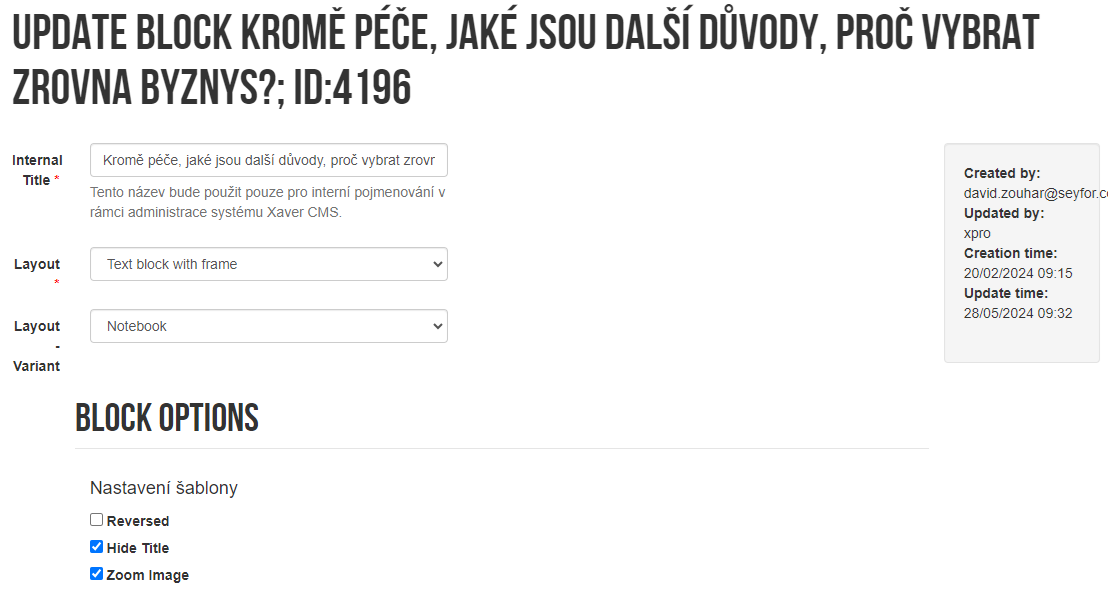
When checked, the user is allowed to expand the image to its original size.
Update availability
The update is available with xmicrosite module version 4.4. The update will be distributed as part of individual site updates. It is now available on the Business site.